Too many passwords, not enough memory? Password managers solve the problem by not only storing your passwords, but also generating new ones, and protecting all your logins in one place.
Let’s be honest, keeping track of all your logins is a pain. Between work tools, personal apps, banking, shopping, and social media, it’s easy to fall into bad habits like reusing the same password or using a weak password (that we think we will remember, but probably won’t…)
But there are better ways to stay secure without making life harder. You’ve probably heard of password managers, passkeys, and biometric logins… but are you using them, and taking advantage of how they work together? Each one helps you log in safely in its own way, and when combined, they create a much smoother and more secure experience.
Here’s a simple breakdown of what they are, how they differ, and how they work together!
Password Managers
A password manager stores all your passwords in one place. You only need to remember one master password (or use biometrics to unlock it, more on this later), and the manager takes care of the rest, generating strong passwords, auto-filling them, even warning you if one’s been compromised, and letting you know if any of your old passwords are weak.
Why they’re useful:
- Password managers autofill your logins so you don’t have to type them
- They generate strong, unique passwords for each account
- They sync across your devices
- Many support two-factor authentication (2FA) for extra protection
- You don’t have to remember dozens of passwords
- It helps you avoid weak or reused passwords
- You can share logins securely with family or colleagues
Popular options:
- 1Password: Great for teams and businesses, with extra features like passkey support and secure sharing
- Bitwarden: Open-source, privacy-focused, and budget-friendly
- LastPass: Similiar to the other two, but had a major breach in 2022 that raised concerns, it is still widely used though.
Built-in tools like Apple’s iCloud Keychain (The Passwords App), Google Password Manager, and Android’s Smart Lock are all password managers. They’re often pre-installed, sync across your devices, and support autofill and biometric login, making them a convenient option for your phones (and other devices).
For businesses, password managers offer admin controls, access logs, and integration with tools like single sign-on (SSO). They also reduce the number of “forgot my password” tickets your IT team has to deal with.
Biometrics: You Are the Password
Biometrics use something you are, like your fingerprint, face, or voice, to confirm your identity. If you’ve unlocked your phone with Face ID or approved a payment with your fingerprint, you’ve used biometrics.
How it works:
- Your device scans a physical trait
- It checks it against a stored version
- If it matches, you’re in
It’s quick, convenient, and hard to fake. Biometrics is often used to unlock password managers or approve logins with passkeys (The next bit).
Why they’re useful:
- Fast and convenient, no typing or remembering passwords
- Hard to fake compared to traditional passwords
- Often paired with other security methods for extra protection
- Great for reducing friction when logging in on mobile devices
Things to keep in mind:
Biometrics aren’t perfect. If your device doesn’t recognise you (think winter gloves or poor lighting), you’ll need a backup like a PIN or password. That’s why biometrics usually work as part of a multi-factor setup rather than on their own.
Passkeys: No Passwords Needed
Passkeys is still quite a new way to log-in for most people but it is a newer way to log in, no password needed. Instead, your device uses a secure cryptographic key pair to prove who you are. You confirm the login using biometrics like Face ID or a fingerprint.
How it works:
- Your device holds a private key
- The website stores a public key
- Your device signs a login challenge
- You approve it with biometrics
Passkeys are already supported by Apple, Google, and Microsoft, used for logging into iCloud, Gmail, Outlook, and more. Many password managers now store passkeys too, making it easy to manage all your credentials in one place.
Why it’s useful:
- No passwords to remember or type
- Much harder for hackers to steal or phish
- Works across devices and platforms
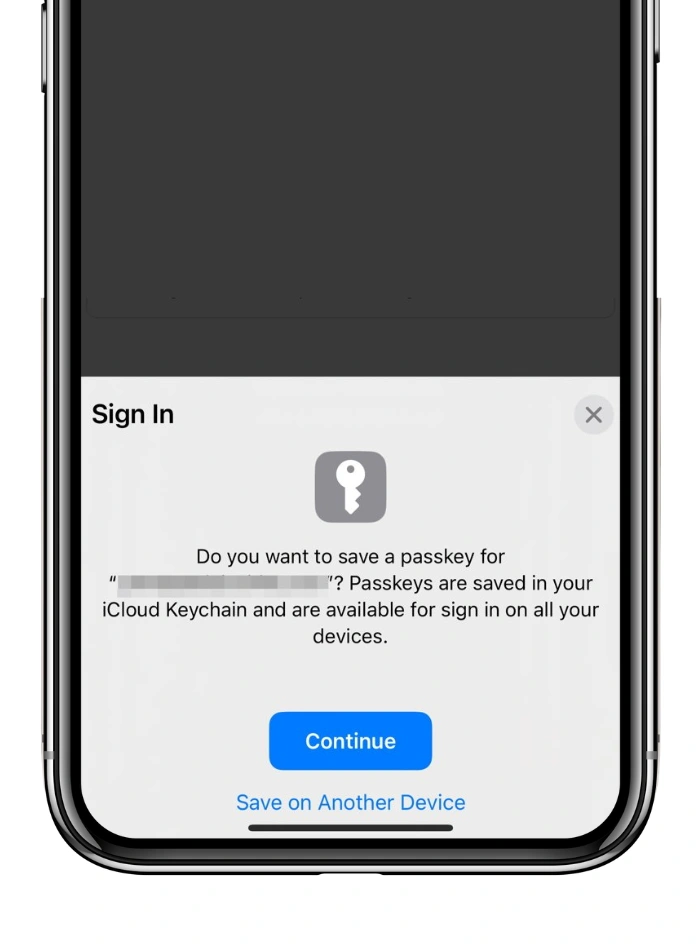
Passkeys are still rolling out, but they’re expected to become the standard for logging in over the next few years. If you’ve ever logged into a site using Face ID or your fingerprint without typing anything, you’ve simply unlocked your device with biometrics and approved the use of a passkey!
So, with all that information, how do they work together?
Your password manager organises your logins, passwords, and passkeys all in one spot. Biometrics make getting in effortless, just a quick scan, and you’re good to go. Passkeys take it even further by ditching passwords completely, while still letting you confirm with biometrics. When you use them together, logging in becomes streamlined and significantly more secure: fewer credentials to manage, reduced complexity, and a stronger defence against cyber threats.
Passwords aren’t going away overnight, but the way we manage them is changing fast. Whether you’re looking for something simple for personal use or a secure solution for your business, there’s a tool out there that can make your life easier and safer!
InfoSec People is a boutique cyber security and IT recruitment consultancy, built by genuine experts. We were founded with one goal in mind: to inspire people to find the careers that inspire them. With the success of companies fundamentally driven by the quality of their people, acquiring and retaining talent has never been more important. We believe that recruitment, executed effectively, elevates and enables your business to prosper.
We also understand that cyber and information security recruitment can genuinely change people’s lives, that’s why we take the duty of care to those we represent very seriously. All our actions are underpinned by our core values:
- Always do the right thing
- Be the best we can be
- Add value
We work with businesses in the cyber/tech arena, from start-ups and scale-ups to FTSE100 and central Government, many of whom are always looking for great people.
Call us directly on 01242 507100 to discuss opportunities or email info@infosecpeople.co.uk.